

Hello there! 😃 Today, we’ll explore how we can calculate the CSS line height property, which defines the height of a line on a webpage. Each line contains the main content (text) as well as the space above and below the content ↕ (line-height). While the default value for desktop browsers is 1.2, we should keep in mind that it can vary depending on the font family. We can also set a custom line-height according to our preferences.
⛔ Please note that the system does not accept negative values. The default value will be automatically used if a negative value is entered.
Below, I have drafted a plan that might help you understand things better. Check it out:
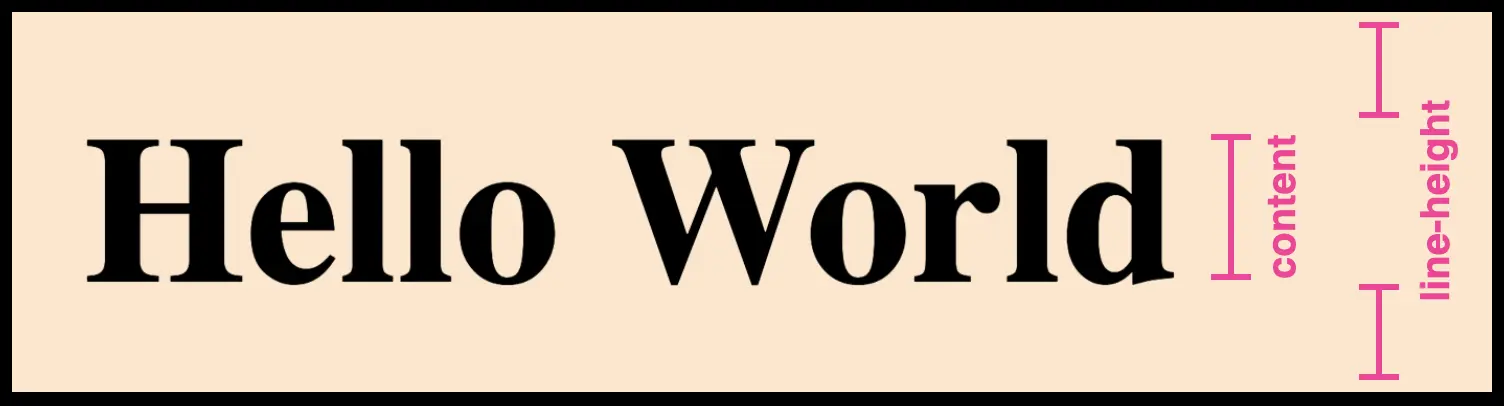
Below is an example to explain this CSS property more analytically.
HTML structure for CSS line height#
We create an HTML document with four headings <h1> . All headings have the same content (text) but different classes, each with unique characteristics concerning the line-height.
<h1 class="line-height-normal">Hello World</h1>
<h1 class="line-height-1">Hello World</h1>
<h1 class="line-height-2">Hello World</h1>
<h1 class="line-height-negative-value">Hello World</h1>
CSS structure for CSS line height#
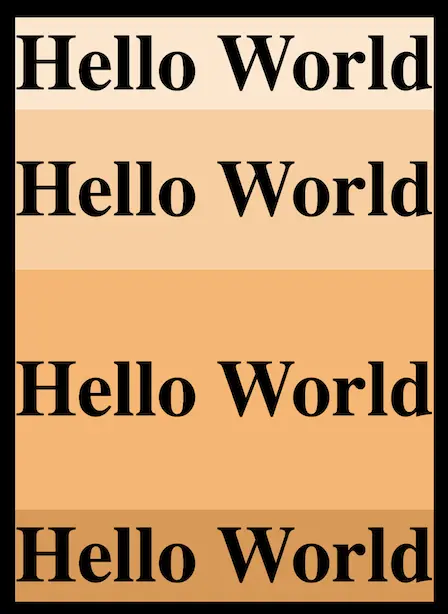
We will move forward with our CSS code and add the necessary characteristics. The first heading has a class with line-height: normal, the second one has a class with line-height: 200px, the third one has a class with line-height: 300px, and the fourth has a class with line-height: -300px (⛔ negative value).
I am using different background-color for each class to easily distinguish them and notice the results clearly. 😉
.line-height-normal {
  background-color: #ffe6cc;
  line-height: normal;
}

.line-height-1 {
  background-color: #ffcc99;
  line-height: 200px;
}

.line-height-2 {
  background-color: #ffb366;
  line-height: 300px;
}

.line-height-negative-value {
  background-color: #E2964A;
  line-height: -300px;
}
In the image that follows, we can see the differences between the four headings regarding their line-height ↕.
Utilizing the line-height CSS property can significantly improve text clarity and visual appeal, creating a comfortable reading experience for users. ✨ 😃