

The Javascript double question mark ?? is known as the nullish coalescing operator. It is a logical operator useful for checking whether a value is undefined or null, allowing us to provide a default value based on that check.
How does the Javascript nullish coalescing operator work? 🧁#
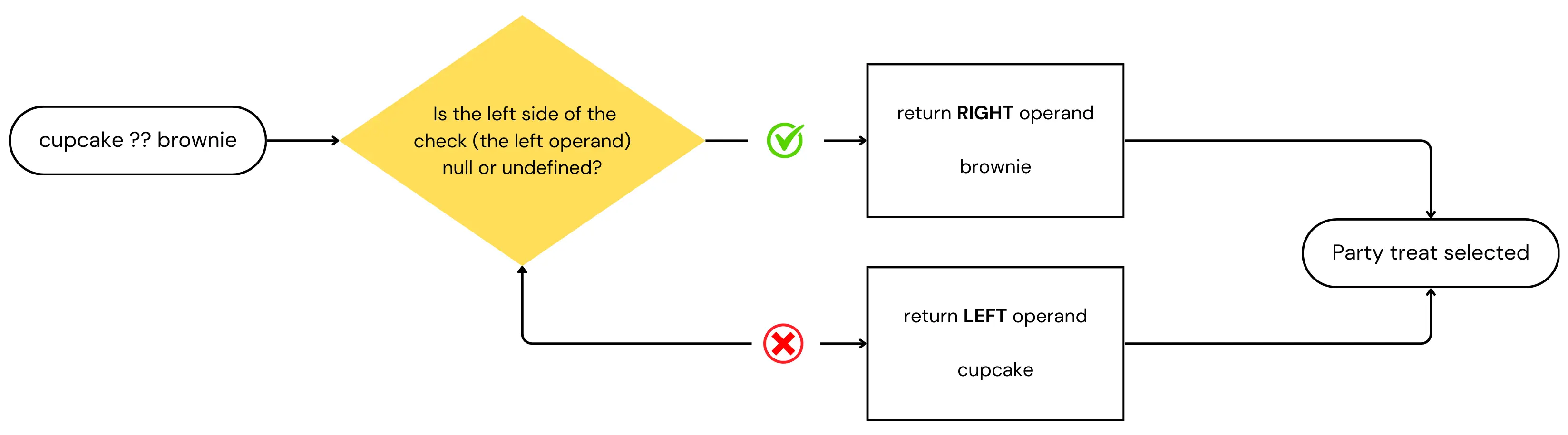
Suppose we want to decide on a party treat based on whether a cupcake is available. If the cupcake is missing (i.e. it’s undefined or null), we’ll go with the brownie instead.
const partyTreat = cupcake ?? brownie;The operator ?? in this snippet returns the right-hand operand – brownie – when the left one – cupcake – is null or undefined.
For those of you who immediately jumped, shouting that this is the same as the logical OR operator ||, hang in there, I’ll get to you soon.
So, to make this crystal clear, let’s see the possible scenarios:
- If the cupcake is
nullorundefined, then ourpartyTreatwill be abrownie. - If the cupcake is anything other than
nullorundefined, then ourpartyTreatwill be thecupcake. I just hope they actually bring a real cupcake, not a truthy version of it… 🥶 (A cold programmer’s joke 🤣_)_.
?? operator: how JavaScript handles nullish valuesChoosing the Right Operator: ?? or ||?#
When it comes to handling default values in JavaScript, understanding the difference between the nullish coalescing operator (??) and the logical OR operator (||) is essential.
While both operators can provide fallback values, they behave differently with certain inputs.
The nullish coalescing operator returns the right-hand operand only if the left-hand operand is null or undefined, making it ideal for cases where you want to avoid falsy values like 0 or ''.
In contrast, the logical OR operator returns the right-hand operand for any falsy value, including 0, NaN, or an empty string.
By now, I am sure you understand that the nullish coalescing operator is a special case of a logical || operator, right?
So, they are different, but what would be a use case where one operator is preferable over the other?
Let’s assume we have a function that gets us a user’s score
// Logical operator || example
function getUserScore(score) {
  const finalScore = score || 100;
  return finalScore;
}

// Nullish coalescing operator ?? example
function getUserScore(score) {
  const finalScore = score ?? 100;
  return finalScore;
}
In the first case, if the score is 0, which is falsy, then the finalScore ends up being assigned the default value of 100, even though 0 might be a legitimate score.
In the second case, that won’t happen. 0 is neither null or undefined, so the finalScore will end being 0, which is indeed a valid score.
The same trap shows up everywhere once you start looking for it, and always with values that are legitimately falsy:
const quantity = cartItem.quantity || 1;   // 0 items becomes 1 item 😬
const nickname = user.nickname || "Anon";  // "" becomes "Anon"
const isPublic = settings.public || true;  // false becomes true — always true, in fact
Swap each || for ?? and all three behave the way the person who wrote them expected. My rule of thumb: if the value could sensibly be 0, "" or false, you want ??. Otherwise the two are interchangeable and || is fine.
The SyntaxError that catches everyone 💥#
Try to mix ?? with && or || in the same expression and Javascript refuses to run the file at all:
const value = a || b ?? "fallback"; // 🚫 SyntaxErrorChrome puts it like this:
SyntaxError: cannot use ?? unparenthesized within || and && expressionsThis is not a bug you have to work around — it’s the language deliberately not guessing. a || (b ?? c) and (a || b) ?? c can return different values, and rather than pick a precedence you’d have to memorise, the spec makes you say which one you meant:
const value = (a || b) ?? "fallback"; // ✅ fine
const other = a || (b ?? "fallback"); // ✅ also fine, different result
Add the parentheses. The error disappears and your intent is on the page for the next person reading it.
?? with optional chaining ?. — the combo you’ll actually use daily#
On its own, ?? is a nice-to-have. Paired with optional chaining it becomes the standard way to read anything out of an API response:
const city = response?.user?.address?.city ?? "Unknown";?. stops the moment it meets null or undefined and hands back undefined instead of throwing TypeError: Cannot read properties of undefined. ?? then catches that undefined and gives you a default. They’re designed as a pair — both treat null and undefined as the special cases and ignore everything else.
The lazy cousin: ??=#
If all you want is “set this if it isn’t already set”, there’s a dedicated operator for it — logical nullish assignment:
const config = { retries: 0 };

config.retries ??= 3;  // stays 0, because 0 isn't nullish
config.timeout ??= 5000; // becomes 5000, because it was undefined
config.timeout ??= 5000 is shorthand for config.timeout = config.timeout ?? 5000, and it’s handy for filling in defaults on an options object without clobbering what the caller passed you.
?? doesn’t evaluate the right-hand side unless it has to#
Worth knowing, because it stops being trivia the moment the right-hand side is a function call:
const settings = cached ?? loadSettingsFromDisk();If cached holds anything other than null or undefined, loadSettingsFromDisk() never runs. That’s called short-circuiting, and it’s the same behaviour || and && have. It means you can safely put an expensive call on the right without paying for it every time — and it also means you shouldn’t put anything there with side effects you were counting on happening.
Frequently Asked Questions#
Can I combine the nullish coalescing operator with other operators in Javascript?#
Yes, you can combine the Javascript nullish coalescing operator (??) with other operators to create more complex logic in your code. For example, by writing something like
const result = userInput ?? (isAdmin && fallbackValue);we first evaluate if the user has entered a value (such as in a form). If userInput is null or undefined, we then evaluate whether the user is an admin.
If the user is an admin, result will be assigned the fallbackValue. If the user is not an admin, result will be false instead.
Note the parentheses around the && part — as we saw above, they aren’t optional styling. Without them this line is a SyntaxError.
How can I chain multiple nullish coalescing operators together?#
You can chain multiple nullish coalescing operators to evaluate different variables. For example, if you have several fallback options, the operator will return the first defined value it encounters:
const partyTreat = cupcake ?? brownie ?? defaultTreat;Chaining ?? with itself is allowed and needs no parentheses — it’s only mixing it with && or || that the parser objects to.
Is ?? the same as || in Javascript?#
No, and this is the whole point of the operator. || falls back on any falsy value — 0, "", NaN, false, null, undefined. ?? falls back on only null and undefined. Every other value, falsy or not, passes straight through.
Can I use ?? with an empty string?#
You can, and it will keep the empty string. "" ?? "fallback" gives you "", because an empty string is a real value — just a falsy one. If you actually want to treat empty strings as missing, ?? is the wrong tool and || is the right one.
What browsers support the double question mark?#
All of them. ?? landed in ES2020 and has been available across every major browser since July 2020, plus Node.js 14 and up. Unless you’re supporting Internet Explorer, you don’t need Babel or a polyfill for it — and a polyfill wouldn’t be possible anyway, since this is syntax rather than a function.
Does ?? work in TypeScript?#
Yes, and it plays especially nicely there. TypeScript narrows the type for you: if score is typed number | undefined, then score ?? 100 is just number, and the “possibly undefined” complaint goes away. That makes it one of the tidiest fixes for a whole family of type errors — we listed a few more in our roundup of common TypeScript errors and how to fix them.
Have you encountered any situations where one operator has significantly impacted your coding experience? If so, please share your examples in the comments below. We’d love to hear your insights!